
HVAC scheduling: balance breakdowns and maintenance plans
Let service plans create upcoming maintenance jobs, then assign the right people and protect space for breakdowns. Keep access, equipment history and customer updates close to the diary.

HVAC scheduling puts predictable maintenance beside work that arrives without warning. A booked service may need a site contact and roof access, while a breakdown caller wants to know how soon someone can attend. Treating both as identical diary entries makes it harder to judge capacity. Start by separating the work types, then bring them together in a realistic daily plan for the people available.
If you are comparing HVAC appointment scheduling software, follow a maintenance visit from its repeating plan through to the technician's assigned job. Our HVAC industry workflow shows how scheduling connects with equipment records, forms, repairs and invoicing. A useful diary makes the next action clear: which jobs exist, who is assigned, what access is agreed and where a change needs a customer conversation.
Separate breakdowns from planned maintenance
For planned maintenance, establish the normal service scope, expected duration and access arrangements before putting repeat work into the diary. For a breakdown, collect the symptoms, unit reference, service address and contact details, then have your team assess the response. Do not let the word urgent remove the need to understand the site or promise an arrival time before checking who can actually attend.
- Planned maintenance needs a repeat pattern, enough time for the agreed checks and access confirmed with the site contact.
- Breakdown assessment needs reported symptoms and a suitable technician, with room for uncertainty about the repair scope.
- Installation work needs equipment readiness, access and the right crew before the date is treated as workable.
- Return repairs need the approved scope and required parts checked before a second visit is promised.
Create a service plan for one customer site
A service plan repeats a visit for one customer site. Enter the agreed first service date, local start time, frequency and number of services, then review the plan before confirming. Choose the interval from your actual service arrangement and professional judgement. A repeat pattern records the timing your business has chosen; it does not decide what maintenance the equipment needs.
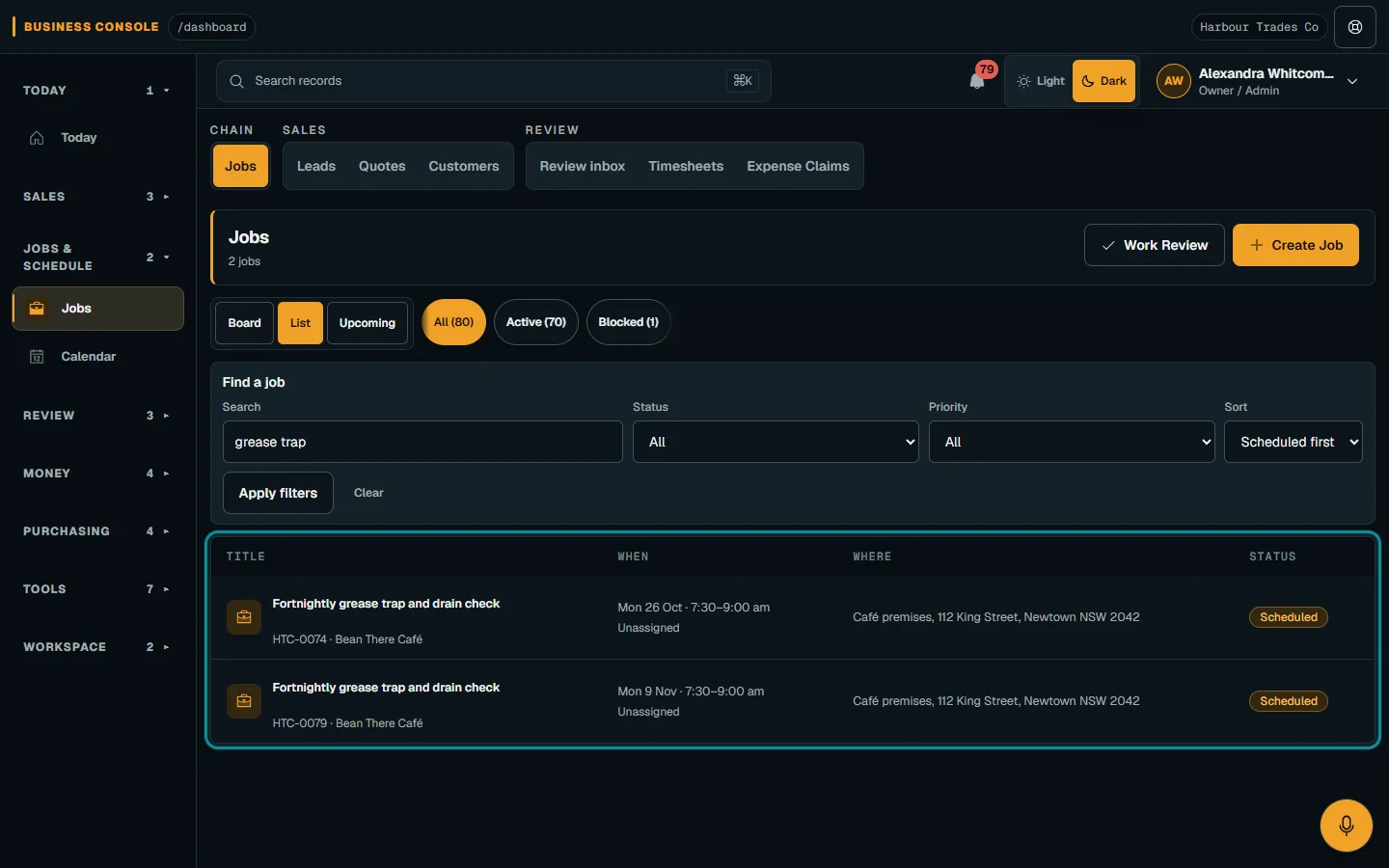
Nenvik works out each active plan's visits ahead and automatically turns each visit in the next 30 days into a Scheduled job. Later visits become jobs as they enter that window. You do not create those jobs yourself. Follow service plans and agreements for the current workflow, keeping any customer agreement terms separate from the repeating visit schedule.
Assign the crew after the job exists
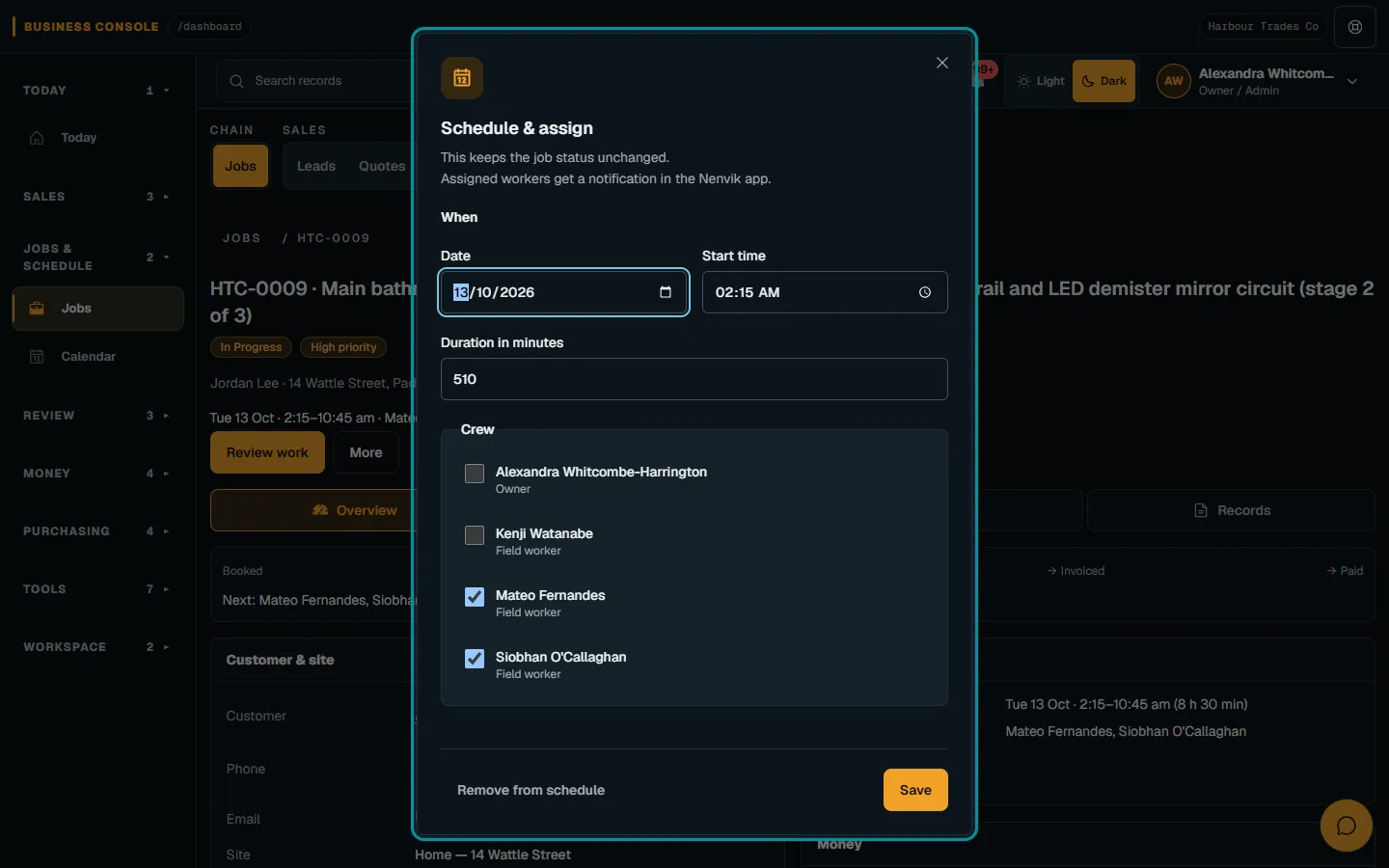
Jobs from service plans never get a crew automatically. Open each upcoming job and assign the people who will do the work, checking availability and site requirements. A Scheduled job is therefore not proof that a technician has been allocated. Make unassigned jobs part of the office's regular review so repeat maintenance does not sit in the diary without anyone responsible for attending.
Use plan and dispatch a job to review the job, schedule and crew. Your business chooses who is suitable, including any support person needed for access or the work itself. Confirm that the planned duration fits the scope and available working time. Keep crew assignment distinct from the customer's requested time, because both need to work before the visit can run smoothly.
Set realistic time windows and travel allowances
Tell the customer what arrival window you can reasonably offer, and record access arrangements with the job. Consider the previous visit, parking, loading, keys, site induction and the time needed to reach the unit. A narrow window may look tidy on a calendar but become unrealistic as soon as a fault takes longer to assess. Leave enough information for the office to explain a delay clearly.
HVAC routing is a planning responsibility here. Your team chooses the visit order and allows for travel between sites; Nenvik does not claim route optimisation. Group nearby work when practical, while checking whether access hours, crew suitability or parts availability make another sequence more sensible. A short drive is only useful when the technician can actually enter the site and complete the agreed work.
Keep a slot free for urgent calls
Use your own recent workload to decide how much room to leave for unplanned attendance. A deliberately open slot gives the office a choice when a breakdown arrives, rather than forcing every new call into a full day. Review that space as the day develops. If it remains unused, decide whether nearby follow-up work can sensibly fit without making another promise you cannot keep.
When a breakdown displaces maintenance, contact the affected customer and agree a revised arrangement before changing the job. Reschedule or cancel each job as usual, then check its crew and access details again. Avoid solving the calendar conflict while leaving the technician or site contact working from an old assumption. The office should own that handover and confirm which visit now takes priority.
Read equipment history before the visit
Keep model, serial number and installation dates in customer assets and service history, with service entries linked to jobs where useful. Review earlier findings before dispatch, especially where several units share an address. Identify the actual unit in the current scope and visit notes. An equipment record is useful only if the technician can distinguish the unit being serviced from the one beside it.
Prepare the technician's service record using assignment forms. Staff apply the template manually to the assignment; the technician enters readings and observations during the visit. Forms do not automatically attach to a customer asset or diagnose a fault. Review submitted evidence afterwards and add the relevant service history entry so the next visit starts with information your team has checked.
Use arrival emails when the plan changes
Once the technician is travelling, authorised office staff can send an on-the-way email using the job's checked customer contacts. The customer communication guide also covers Running late and Arrived emails. These are manually sent email updates, not location-triggered messages. Use them to keep the contact informed after dispatch, with an honest update when the earlier arrival arrangement no longer looks realistic.
Review jobs and plan changes separately
Plans can be edited, paused, resumed or ended. Editing a plan applies to visits that are not jobs yet; already created jobs keep their time and crew, so review those separately when a customer changes arrangements. Pausing skips future visits while paused and leaves existing jobs booked. Ending stops new jobs, with an option to cancel upcoming Scheduled jobs that nobody has started. Check both the plan and the job list before closing the conversation.
Make the next day's dispatch a shared review
Before the office finishes, review the next day's jobs with the people responsible for dispatch. Look for unassigned maintenance, unresolved access, missing equipment details and return repairs waiting on parts. Check that an adjustment made during a breakdown call has not left another visit with the wrong time or crew. Decide who will contact each affected customer. A short review works best when every open question has an owner and a clear next action.
At the start of the day, ask the technician to review their assigned work and raise anything that does not match the practical plan. That might be a unit identifier that is unclear, an access contact who is unavailable or a job duration that no longer fits the approved scope. Resolve the mismatch before treating the calendar entry as a complete instruction. Keep technical decisions with the qualified team and customer arrangements with the person authorised to change them.
Common questions
Does a service plan create upcoming HVAC jobs automatically?
Yes. A service plan repeats a visit for one customer site. Nenvik works out active plans' visits ahead and automatically creates a Scheduled job for each visit in the next 30 days.
Are technicians assigned to service plan jobs automatically?
No. Jobs never get a crew automatically. Open each job and assign suitable workers, then reschedule or cancel it as usual if arrangements change.
Does Nenvik optimise HVAC routes?
No route optimisation is claimed. Your team chooses the visit order, travel allowance and arrival arrangements using the job schedule and site information.
Can we pause or change a maintenance plan?
Plans can be edited, paused, resumed or ended. Changes apply to visits that are not jobs yet; review existing jobs separately because pausing or editing does not remove their bookings.
Can technicians send an on-the-way text from the field?
The audited arrival-update workflow is email, manually sent by authorised office staff. It supports On the way, Running late and Arrived emails; it does not provide technician-sent arrival texts.
More from the blog
 HVAC invoicing: from the completed service job to a clear billTurn the completed service record into an invoice the customer can understand. Keep labour, parts, deposits and confirmed payments connected to the job.Read article
  How to quote a price for a job: work out the cost before the totalA useful quote starts with what the work will cost your business. Build the price from labour, materials and overheads, then allow for risk and the profit you choose.Read article
  How to quote glass and glazing jobs from measure to fittingA glazing quote needs a reliable record of each opening before glass is ordered. Keep measurements, product decisions and fitting assumptions connected through to installation.Read article