
Tax invoice requirements in Australia: a checklist for tradies
Know what belongs on an Australian tax invoice, when a customer can ask for one and what to review before sending the bill.

A tax invoice needs to do more than tell a customer how much to pay. It identifies the seller, describes the sale and explains the GST treatment. For a trade business, the practical challenge is making those details clear while turning completed work into a bill. A short review before sending can catch an incorrect business identity, a missing description or a total that does not match the items.
This checklist uses the Australian Taxation Office's Tax invoices page as its source, as recorded in our review on 22 October 2026. The detailed ruling is GSTR 2013/1. Check with your accountant or the ATO for your situation. Use the tax invoice template as a blank starting point, then check the actual document you intend to send rather than relying on its title alone.
When must you give the customer a tax invoice?
The ATO's Tax invoices page says that when a customer asks for a tax invoice, you must provide one within 28 days, unless the sale is $82.50 including GST or less. Keep that threshold tied to the request rule. It is not a reason to ignore the details of a larger sale or leave a customer's request sitting unanswered while you finish other administration.
Give the office a clear way to record the request and identify the relevant work. Confirm which customer and invoice the request concerns, especially when a customer has several properties or visits. Follow the invoice and payment workflow to prepare and review the document. Resolve questions about what was supplied before issuing, so a rushed response does not replace one administrative problem with another.
The seven details for taxable sales under $1,000
For taxable sales under $1,000, the ATO requires enough information to clearly determine the following seven details. Read them as a checklist for the whole document. A familiar logo or a large total does not replace the seller's ABN, an issue date or an explanation of what was sold. Descriptions should help the customer recognise the work without needing to decode your internal notes.
- The document is intended to be a tax invoice.
- The seller's identity.
- The seller's Australian business number, or ABN.
- The date the invoice was issued.
- A brief description of the items sold, including quantity where applicable and price.
- The GST amount, if any, shown separately; where GST is exactly one-eleventh of the total, a statement that the total price includes GST can be used.
- The extent to which each sale on the invoice is a taxable sale.
Use the checklist in the same order each time. Start with identity and date, read the item descriptions and quantities, then reconcile the tax treatment with the totals. If someone else prepares your invoices, make this review part of the handover. The person checking the bill should be able to trace the descriptions back to the completed work and agreed scope without guessing what a vague labour entry means.
At $1,000 or more, identify the buyer too
For sales of $1,000 or more, the tax invoice also needs the buyer's identity or ABN. Invoices that meet those requirements can be used for smaller sales as well. Check who the buyer actually is before sending. A service-site nickname may help your crew find the property, but the billing document needs the buyer information appropriate to the sale.
Keep customer information current through customers, contacts and service sites. Review the buyer and the service address separately: the person arranging access may differ from the business buying the work. Ask for clarification when those details are uncertain. Correct the customer information through the supported workflow and check the invoice document again before treating it as ready to issue.
Make mixed taxable and non-taxable items clear
An invoice with taxable and non-taxable items needs more care than a single fully taxable sale. The ATO says an invoice containing GST-free or input-taxed items alongside taxable items must clearly show which items are taxable, each taxable sale, the GST amount and the total amount to be paid. Do not apply a blanket statement about included GST without checking whether it accurately describes the sales on that invoice.
Review the treatment line by line before reviewing the combined total. If you are unsure how an item should be treated, check with your accountant or the ATO for your situation. The GST calculator can help check arithmetic for an amount fully subject to standard GST; it does not classify a sale or decide the treatment of a mixed invoice.
Emailed PDFs and GST rounding
Tax invoices do not have to be on paper. An emailed PDF is acceptable when it contains all the required information. Open the PDF you plan to send and check that the business identity, date, item descriptions and GST details are readable. Reviewing the finished document matters because the customer sees that output, rather than the fields you remember entering on an editing screen.
For one taxable sale, the ATO's rounding rule is to round GST to the nearest cent, rounding half a cent upwards. Check the calculation before deciding that a small difference is harmless. This article does not extend that single-sale rule into a method for every multi-item invoice. For a more involved calculation, check the ATO guidance and discuss the method with your accountant.
What to review on a Nenvik invoice
Nenvik lets authorised staff prepare and issue an invoice from a job, keeping it connected to the work record. The invoice document displays the business name, a recorded seller ABN when present, the issue date and item descriptions, quantities and prices. GST line amounts and totals appear when the document's tax settings call for them. Enter accurate business details and check the actual output; an empty or incorrect source field cannot provide the right information.
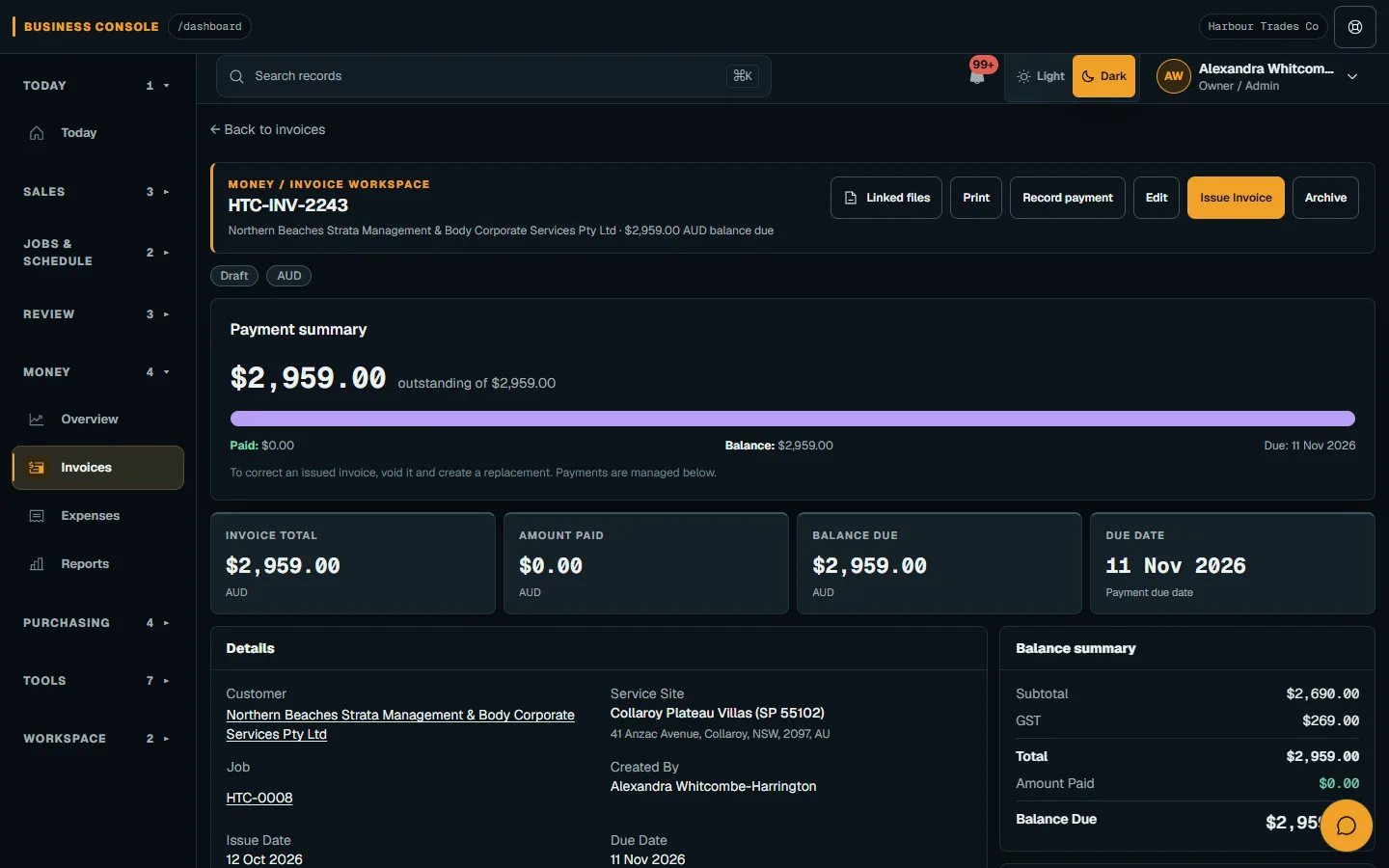
Review company and document defaults before relying on them in customer paperwork. Then check the buyer, issue date, supplied items and GST presentation on the individual invoice. These fields support preparing the document; they do not replace your judgement about the sale or an accountant's review. Avoid assuming an invoice is correct simply because it was created from an accepted quote.
Make the final check repeatable
Keep the customer conversation practical when an invoice is queried. Ask whether the question concerns the buyer details, a description, the GST treatment or the amount. Those are different checks, and each needs the relevant source information. For example, a clear service address helps locate the visit, while the seller's identity and ABN belong to the issuing business. Explain the relevant detail using the document the customer received, then resolve any genuine error through your normal review process.
Choose who reviews invoice details and who handles questions before the bill goes out. Compare the supplied work with the item descriptions, confirm the seller and buyer information, then check taxable treatment and totals. Keep the source record close enough that another staff member can answer a customer's question. If something needs correction, resolve it through the supported invoice process and review the resulting document before sending it.
A useful routine is to check one completed job from its work record through to the customer-facing invoice and PDF. Note any missing source detail and fix the handover for the next job. Keep the ATO's Tax invoices page and GSTR 2013/1 as your reference for requirements, and check with your accountant or the ATO for your situation when the sale or document raises a question.
Common questions
How long do I have to provide a requested tax invoice?
The ATO's Tax invoices page says within 28 days when a customer asks, unless the sale is $82.50 including GST or less. Check with your accountant or the ATO for your situation.
When does a tax invoice need buyer identity or ABN?
Sales of $1,000 or more need the buyer's identity or ABN as well as the other required details. An invoice meeting those requirements can also be used for smaller sales.
Can I email a tax invoice as a PDF?
Yes. A tax invoice does not need to be paper. An emailed PDF is acceptable if it contains all the required information.
What if the invoice has taxable and GST-free items?
Clearly show which items are taxable, each taxable sale, the GST amount and the total payable. Check the treatment with your accountant or the ATO for your situation.
Does using invoice software settle the tax treatment?
No. Review accurate seller and buyer details, descriptions, quantities, prices and GST presentation on the actual document. Check with your accountant or the ATO for your situation.
More from the blog
 How much to charge per hour as a tradie: work it out from your costsBuild a charge-out rate from the costs of your own business and the hours you can bill, then use it to check hourly work and fixed-price quotes.Read article
  HVAC invoicing: from the completed service job to a clear billTurn the completed service record into an invoice the customer can understand. Keep labour, parts, deposits and confirmed payments connected to the job.Read article
  HVAC scheduling: balance breakdowns and maintenance plansLet service plans create upcoming maintenance jobs, then assign the right people and protect space for breakdowns. Keep access, equipment history and customer updates close to the diary.Read article