
Variations and change orders: recording extra trade work
Keep the accepted quote intact, describe the proposed change and ask the customer to decide on that exact scope and price.

Extra work often starts as a reasonable question on site: could we replace this fitting as well, change the finish or extend the repair into the next area? The difficult part is keeping the new request distinct from the work already agreed. A useful variation record explains what changes, what it costs and which customer decision the business is waiting for.
Whether you call it a variation to contract, a change order or an extra-work request, make the proposal understandable before seeking approval. This guide covers practical records and Nenvik's Job Change Order workflow. For glass, windows and doors businesses, for example, a changed product choice or additional opening should be clearly distinguishable from the accepted quote.
Compare the request with the agreed work
Read the accepted scope before deciding that a request is extra work. Identify the area, task or product involved and check the inclusions, exclusions and customer selections. A vague original description can make the discussion harder. Ask the office to resolve uncertainty before a worker promises a new price or starts work that the customer may believe was already included.
Give the proposal a useful title and describe the difference in plain language. Explain what will be added, removed or replaced and any part of the original scope that remains relevant. Avoid copying an entire conversation into the change description. Someone who was not on site should still be able to understand the commercial decision being requested.
What should a variation form include?
- The correct customer, site and Job reference.
- A short title identifying the proposed extra or changed work.
- The reason for the proposal and a clear description of the difference.
- The included work, exclusions and unresolved questions.
- The proposed subtotal, tax and total for the change.
- Any timing or access arrangements that need a separate discussion.
- The exact proposal presented to the customer and its recorded decision.
Treat that checklist as preparation for a conversation and record, rather than a statement of legal requirements. Check the relevant state regulator for contract rules that apply to your work. Nenvik's published approval history records the product workflow; it does not decide whether your underlying contract documents or commercial arrangements meet the requirements for a particular job.
If the request affects timing, say what still needs checking. You may need to review product availability, site access or the existing schedule before committing to attendance. Keep those discussions specific. A customer's agreement to a price change should not leave the office guessing whether someone also promised a new completion date during a separate phone call.
Keep the accepted quote intact
In Nenvik, accepted quotes stay locked. The quote revision guide explains that later changes go through a Job Change Order. Do not treat a later request as permission to overwrite the original agreement. Keeping the accepted scope available lets the office, worker and customer refer to the same starting point when discussing the proposed difference.
Before acceptance, the quote revision workflow applies to eligible sent, declined or expired quotes. After acceptance, use the separate Job change process. For improving the original scope, read how to write a quote that wins the job. Clear inclusions and exclusions make later discussions easier because both parties can identify what was originally offered.
Open Changes on the exact Job
The Job Change Orders and customer approval guide sets out the prerequisites. The Job must be Scheduled, In Progress or On Hold; a Draft Job must first be scheduled. The exact Job needs Customer Portal visibility, and the business's package and Team role must allow Job management and commercial signatures. Check those requirements when the workspace is unavailable.
Open Job → Changes. Enter a clear title and customer-visible changed-work description, then check the subtotal and tax. Nenvik calculates the total using the Job's currency. Read the proposal as the customer will see it: does it explain the new work without requiring access to private staff notes or an earlier conversation with the technician?
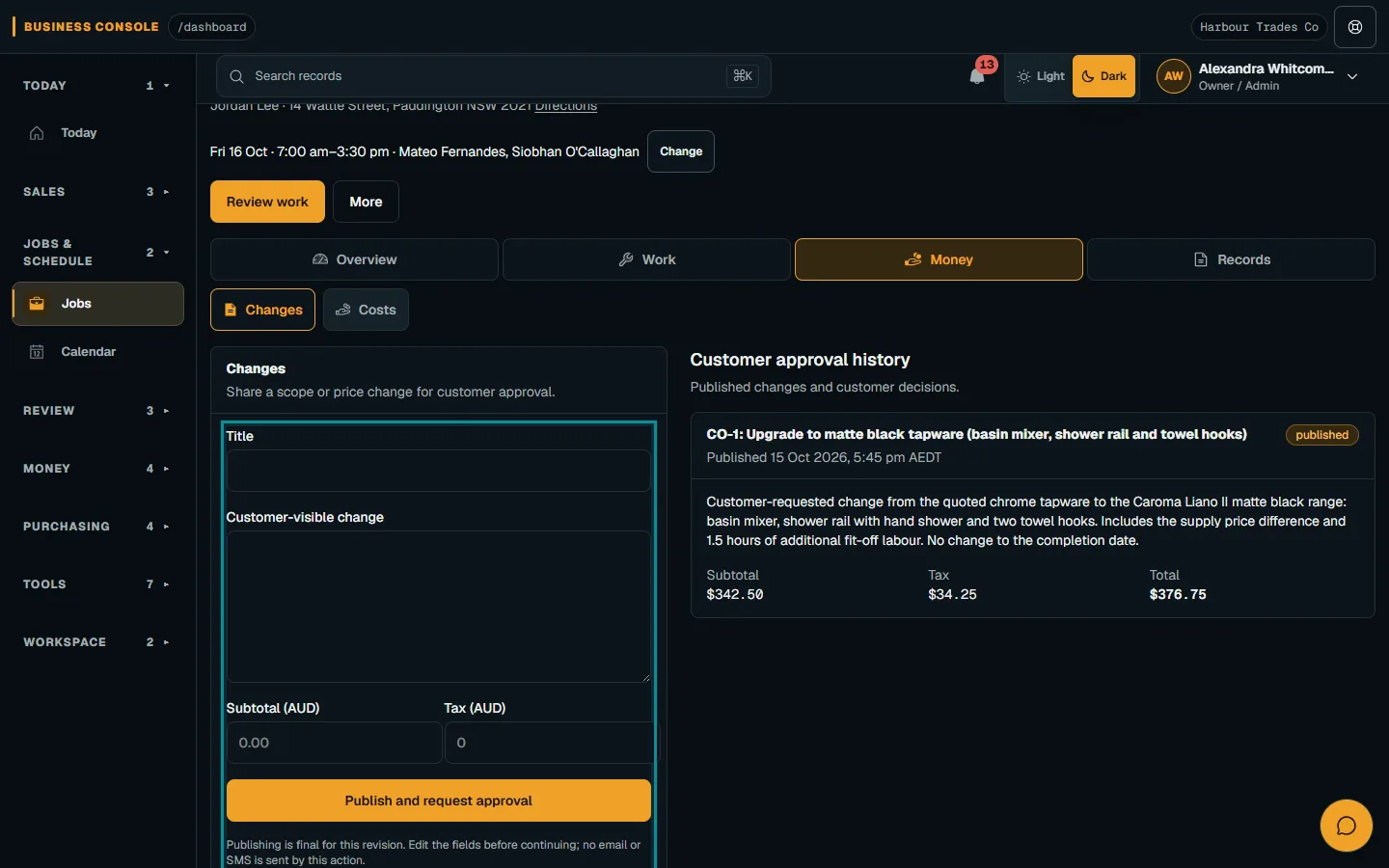
Publish one proposal for the customer to review
Choose Publish and request approval only after reviewing the fields. The action saves a read-only customer copy and creates an approval request. It sends no email or SMS. Plan a separate customer conversation through your normal communication process so the person knows where to review the proposal. Do not assume that publishing the change has notified them.
The customer opens the already-visible Job in the Customer Portal and reviews the saved description, amounts and status. The customer Job and invoice guide describes reviewing Change Orders on that exact Job. Active Portal access, a live session and current Job visibility are needed to answer. Access to one Job does not provide access to another.
Publishing, approving and declining require a current connection. If a request has expired or been revoked, the customer cannot answer it. Review the current Job and request before acting. Revoking Portal visibility prevents a later decision even if an older page remains open, so an old browser view should not be treated as a current approval route.
Check the recorded customer decision
Give the customer room to ask a scope question before deciding. If the description leaves them unsure which fitting, room or task is affected, resolve that ambiguity instead of asking them to approve a broad heading. Keep your explanation consistent with the published proposal. Where the commercial change itself is different, prepare a new Change Order rather than relying on a verbal qualification that is absent from the saved customer copy.
Sign and approve records the signature evidence and approval together with completion of the request and the Change Order outcome. Decline records the matching decision without creating signature evidence. The typed or drawn mark records deliberate acceptance of that exact publication. Read the recorded outcome rather than treating a casual conversation or the fact that a page was opened as the decision.
If the customer sees a conflict after responding, reload the Job and review the current outcome. Do not keep submitting a different answer to replace the saved evidence. Change Order history is permanent; a genuinely different commercial change needs a new Change Order. If the request is expired or unavailable and the change still applies, authorised staff must publish a new one.
Keep visit sign-off separate from variation approval
An office review should also distinguish approval from completion. A customer may approve a proposal before the team has obtained the materials or attended again. Check the planned work and visit evidence through the appropriate job process. Do not describe the extra work as completed simply because the commercial decision has been recorded.
Nenvik's optional Customer sign-off on an assignment confirms that the recorded visit work was carried out at the site. It is not payment approval and is not variation approval. The assignment forms and submission guide explains that separate visit step. Do not hand a customer the worker's sign-off screen as a substitute for reviewing a proposed scope and price change.
After reviewing the decision, give the team a clear handover about the work to carry out and any questions still unresolved. A free job sheet template can help organise visit instructions in a paper process. Keep the approval record available alongside those instructions so the worker can distinguish the agreed change from a further request raised during attendance.
Before closing the office handover, compare the proposal, recorded decision and planned next action. Resolve a declined or unanswered request rather than letting it drift into the work list. Keep later billing review tied to the actual agreement and evidence. The useful result is a change that the customer can understand and the team can carry out without reconstructing the conversation from memory.
Common questions
Can I edit an accepted Nenvik quote to add extra work?
Accepted quotes stay locked. Later changes use a Job Change Order, with the proposed scope and price published separately for the customer to review.
Does publishing a Job Change Order email the customer?
No. Publish and request approval saves the customer copy and creates the approval request, but sends no email or SMS. Arrange a separate customer conversation about reviewing the proposal.
Does customer visit sign-off approve a variation?
No. Optional Customer sign-off confirms visit work at the site. It does not approve a variation or payment; the Job Change Order decision is separate.
Can a recorded change decision be rewritten?
Change Order history is permanent. A genuinely different commercial change requires a new Change Order. Review the latest recorded outcome if a customer encounters a conflict.
More from the blog
 Locksmith call-outs: dispatch, install quotes and getting paid on siteKeep urgent call-outs and planned installs in the same diary, with clear job records, agreed charges and confirmed payments.Read article
 Deposits on quotes: a practical guide for tradiesExplain a deposit before the customer accepts, check the resulting invoice and confirm payment separately from acceptance and scheduling.Read article
 Late payments and invoice reminders for tradiesMake the invoice clear, check the live balance before following up and use reminders with a deliberate delivery setup.Read article