
Deposits on quotes: a practical guide for tradies
Explain a deposit before the customer accepts, check the resulting invoice and confirm payment separately from acceptance and scheduling.

A deposit on a quote should be part of a clear conversation about the work. The customer needs to understand what they are accepting, when the deposit is due and what happens next. Your office needs to distinguish agreement from money received. Those are separate events, even when the customer accepts the quote and opens the payment page during the same conversation.
This guide covers when to ask for a deposit, what to explain and how Nenvik handles quote deposits and deposit invoices. It does not recommend a deposit size. For businesses ordering products for a particular property, the glass, windows and doors workflow provides a relevant setting: scope, customer choices and the next purchasing decision all need to be clear.
Start with the reason for the deposit
Before asking the customer for money, identify the decision the deposit supports. You may be preparing to order a product selected for the job, committing time to preparation or arranging the next stage of work. Explain that reason in ordinary language. A deposit request is harder to understand when it appears at the bottom of an otherwise complete quote without any earlier discussion.
Keep the reason tied to the actual scope. If measurements, finishes or product choices are still unresolved, explain which details need confirmation before an order can proceed. Do not imply that paying a deposit settles every open question. Use the quote to record the agreed work and make the outstanding decisions visible before asking the customer to accept.
How much deposit should you ask for a job?
There is no figure recommended here. Review the work, your proposed terms and the rules that apply to that kind of job before setting a deposit. Check the relevant state regulator for contract requirements and have your terms reviewed for the work you perform. A familiar practice from a different trade or an earlier job is not enough to settle the question.
Nenvik can show a domestic-building deposit-cap warning, but the help explains that this is a warning only. It does not block saving or customer acceptance and does not provide legal advice. Treat it as a prompt to review the proposal. A quote being saved successfully is not confirmation that the deposit or contract terms suit the particular work.
Discuss the timing before sending the quote
Consider the customer's questions as well as your preparation needs. They may want to understand the product selection, the order of work or who will contact them after acceptance. Write down the answers that affect the agreement before sending it. If you need advice on a term, resolve that question first rather than relying on a later phone call to explain a condition the customer has already accepted.
Raise the deposit while discussing scope and next steps, then put the arrangement into the quote the customer reviews. Explain when it becomes due, how the customer will receive the invoice and who will confirm the next action. Avoid introducing a new payment expectation after the customer has already agreed to a different understanding of the job.
- Describe the work and customer choices covered by the quote.
- Explain the deposit arrangement and the point at which it is due.
- Identify any details still needing confirmation before preparation or ordering.
- Explain how the customer can review the invoice and make payment.
- State who will confirm the booking or next stage after checking the records.
For the wider document, read how to write a quote that wins the job. If you are drafting your process on paper, the free quote template can help you organise scope and terms. Review the completed document carefully; a blank template cannot decide the appropriate deposit or the contract requirements for your business.
Set Deposit on acceptance in Nenvik
The deposit on quote acceptance guide describes the exact setup. Use a quote linked to a Customer rather than a Lead, with Invoices enabled. Quote management access is needed to edit the deposit. The person publishing also needs invoice management permission and Invoices access for automatic issuance. Resolve missing access before relying on that workflow.
In the quote, open Deposit on acceptance and choose a percentage-based or fixed deposit including GST. Check the result in Preview before sending. This describes the available controls, rather than suggesting which setting to use. Read the customer-facing scope and terms together with the deposit so the request makes sense as part of the whole quote.
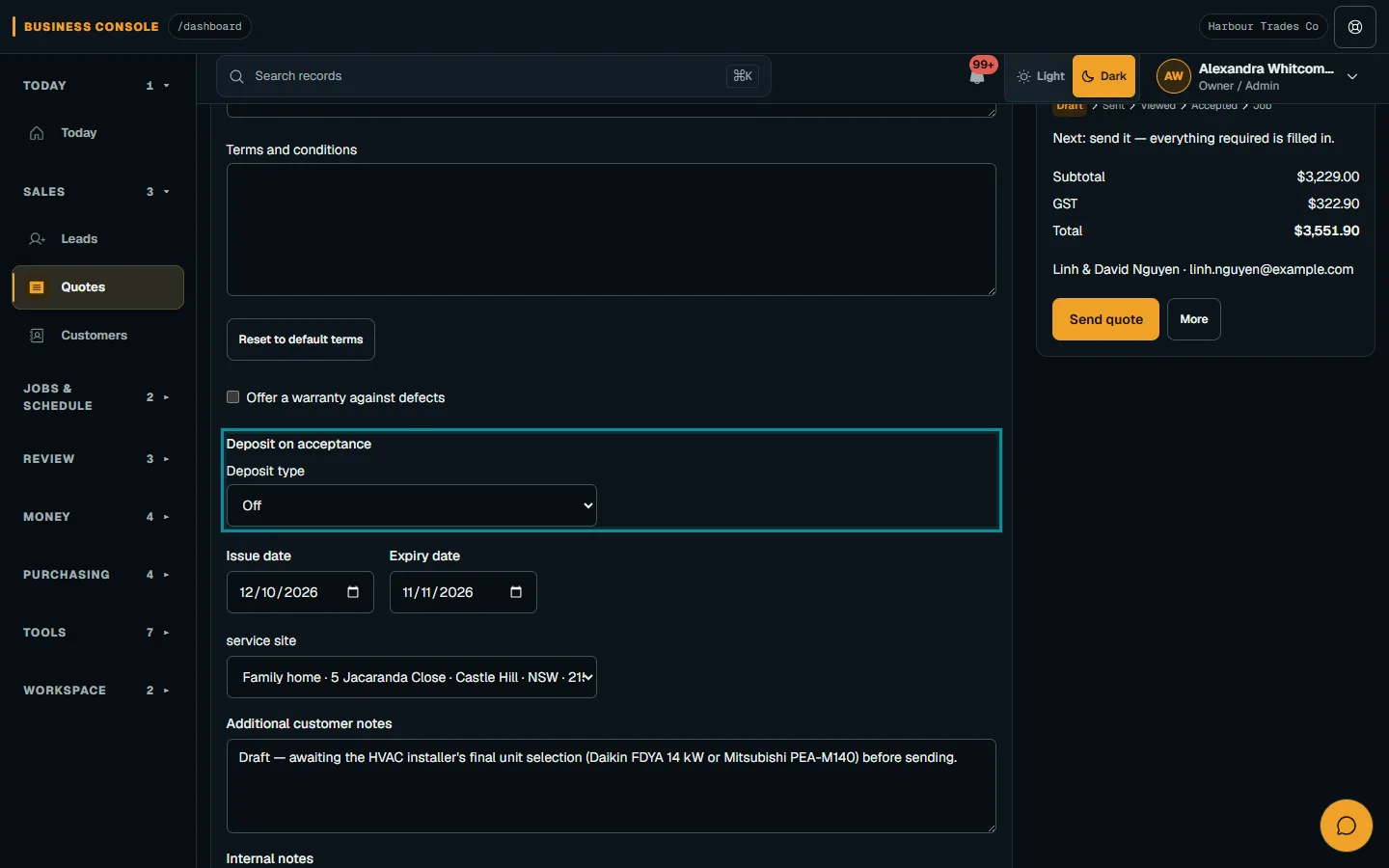
Follow create and publish a quote to review and send the customer document. If the customer needs clarification, answer it before asking for a decision. Keep the office's explanation consistent with the published quote rather than making separate promises in conversation that the next staff member cannot see in the agreement.
Check acceptance, invoice and payment separately
Customer acceptance automatically creates and issues the deposit invoice from the accepted quote when the required access is in place. If issuance needs staff review, check the Draft invoice before issuing it. When the invoice is missing or unavailable, review the Customer, Invoices access and publisher's invoice permission. Do not assume that a recorded acceptance proves the invoice was issued.
When online payments are set up, the customer can choose Pay deposit now on the secure quote page or in the Customer Portal. Acceptance alone does not confirm payment and does not schedule a Job. Tell the customer what your business will check next, and have the office confirm the actual payment record before treating the deposit as received.
For online collection, the Owner connects the business's own Stripe account as described in connect Stripe and take card payments. Check that payments are ready. A return from checkout is not payment confirmation. If online payment is unavailable, confirm the payment arrangements with the customer and record a payment only when there is genuine evidence of receipt.
Review later invoices without losing the deposit trail
The invoice and payment workflow also covers creating deposit or progress invoices from an accepted quote or its Job. Choose Create deposit invoice and review the Draft before issuing it. Keep that staff-created step distinct from the deposit-on-acceptance arrangement so nobody creates another invoice simply because they have not checked what already exists.
Create final invoice prepares Less deposit lines for eligible earlier deposit invoices on that quote. Those lines preserve the earlier subtotal and GST; they can be removed but not edited. Review the credits and totals before issuing. A deposit credit and a payment record serve different purposes, so check the live balance and payment history as well as the invoice lines.
Finish with a clear office handover
Use precise language when confirming progress. Quote accepted, deposit invoice issued and deposit payment confirmed each describe a different result. Tell the customer which one you have checked and what remains outstanding. If a colleague takes over, pass on the invoice reference and unresolved questions through your normal office process. They should not need to infer receipt of money from a booking conversation or a note that simply says customer happy to proceed.
Before confirming the next stage, check the accepted scope, deposit invoice, payment evidence and any unresolved customer choices. Accepted quotes stay locked; later scope changes use a Job Change Order. Keep the original agreement available and make the next action explicit. The customer should know whether you are confirming receipt, arranging attendance or asking for information needed before work can proceed.
Common questions
When should a tradie ask for a deposit?
Discuss the arrangement before sending the quote for acceptance. Explain why it is requested, when it is due and how the invoice and next stage will be handled. Review the terms for the particular work.
How much deposit should I ask for a job?
This guide does not recommend a deposit size. Review the work, your terms and applicable requirements with the relevant state regulator or adviser before choosing the setting.
Does accepting a Nenvik quote confirm the deposit is paid?
No. Acceptance can create and issue the deposit invoice, but payment must be confirmed separately. Acceptance does not schedule a Job either.
Can the customer pay the deposit online?
When online payments are set up, the customer can choose Pay deposit now on the secure quote page or in the Customer Portal. Check confirmed payment evidence afterwards.
More from the blog
 Locksmith call-outs: dispatch, install quotes and getting paid on siteKeep urgent call-outs and planned installs in the same diary, with clear job records, agreed charges and confirmed payments.Read article
 Late payments and invoice reminders for tradiesMake the invoice clear, check the live balance before following up and use reminders with a deliberate delivery setup.Read article
 Variations and change orders: recording extra trade workKeep the accepted quote intact, describe the proposed change and ask the customer to decide on that exact scope and price.Read article