
How to follow up a quote without making it awkward
Give customers a useful next step, check the current quote before contacting them and keep follow-ups separate from revisions and booking decisions.

Following up a quote is easier when the message has a useful purpose. You might be checking that the customer can access the document, answering a question about scope or asking whether their timing has changed. Repeating a request for a decision without adding context can make an ordinary conversation feel like pressure. Start with what the customer needs to decide.
For an Australian trade or service business, quote follow up also needs coordination. The owner should know whether the office has already called, whether the customer has replied and whether the quote is still current. This guide explains how to follow up a quote, with practical wording and Nenvik's documented controls. The broader workflow sits within job sheet software and job records.
Check the current quote before contacting anyone
Open the actual quote and read it as the customer would. Check the recipient, scope, options, exclusions, expiry and proposed next step. Look for a recent question or decision before sending another message. A follow-up that ignores an earlier reply creates extra work for both sides and can leave the customer wondering whether the right person is managing the enquiry.
If the price or scope needs work, fix that issue through the appropriate revision process. Chasing a decision on an unclear document is unlikely to resolve the underlying problem. For preparation, use how to quote a price for a job and how to write a quote that wins the job. Those guides cover the quote itself; follow-up starts with a document you are ready to stand behind.
Let the customer's decision shape the timing
Ask about decision timing when discussing the work. A customer waiting for another household member, building access or an internal purchasing decision may need a different follow-up from someone trying to arrange an urgent visit. Agree when you will check back where possible. Choose a time that gives them a fair chance to read the quote and gather questions.
Use a simple sequence: confirm access if needed, ask whether the scope needs clarification, then check the decision before the quote expires. Treat that sequence as a working approach rather than a compulsory sales script. If the customer gives a preferred date, use it. If they say the work is no longer required, acknowledge the answer and stop pursuing that particular quote.
- Check whether a promised reply date has arrived before contacting the customer.
- Read recent conversations so another staff member does not repeat the same call.
- Choose one clear purpose for each follow-up.
- Review expiry and current availability before discussing a booking.
- Pause planned reminders while a substantive question is being resolved.
Keep the message short and specific
A useful opening is: I am checking that you could access the quote for the work we discussed. Is there anything in the scope you would like me to clarify? Add the job description so the customer recognises the enquiry. Keep the question easy to answer and avoid implying that silence means agreement. Check any link before sharing it through your normal communication process.
If they have read the quote, try: Have you had a chance to review the included work and options? If your timing or requirements have changed, let me know so I can review the quote. This invites a useful response without offering an uncosted discount. A customer's uncertainty may concern access, inclusions or timing rather than the final amount.
Before expiry, a practical message is: The quote is valid until the date shown on the document. Would you like anything clarified before then? If you need more time, please contact us so we can review the details. Only discuss a start date after checking your commitments. A quote expiry date should not be presented as proof that a crew slot is reserved.
Understand what Viewed actually tells you
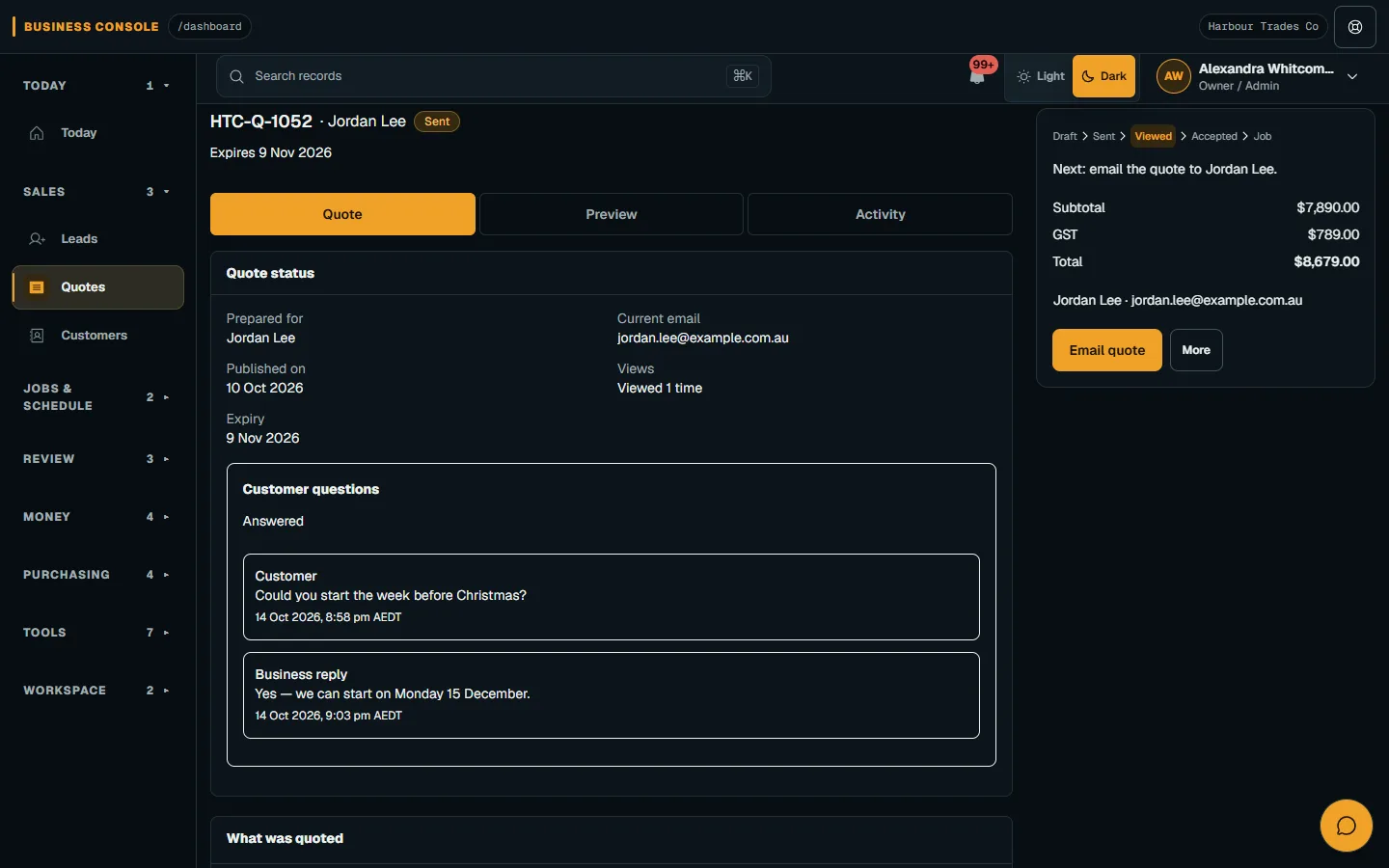
Nenvik records a customer view when the secure quote link or portal quote is opened. Staff receive a first-view notification, and the sent quote can show Viewed in the register. Staff views do not count and email opens are not tracked. A view tells you that the quote was opened through those customer routes; it does not establish that every inclusion has been understood.
Use Quote views and follow-ups to check Activity and the current follow-up state. Review any recorded acceptance or decline before contacting the customer. Acceptance, decline and expiry stop follow-ups. Treat a customer's decision as the point to choose the next workflow, rather than leaving a reminder sequence running after the conversation has moved on.
Set automatic email follow-ups deliberately
Nenvik's automatic email follow-ups are off by default. The Owner can enable them in Company settings → Quote defaults. The default steps are day 2, day 7 and 3 days before expiry; setting a step to 0 disables it. Review the schedule against your normal customer conversations before enabling it, particularly if someone also makes personal follow-up calls.
Delivery runs on weekdays from 09:00 to before 17:00 in company time, at most once per 24 hours. Missed steps are not sent late after their delivery window. Each follow-up email carries a fresh secure link. These controls support a planned process, but staff still need to check the customer conversation and current quote before making their own contact.
On a sent quote, open More and choose Pause or Resume. Activity shows the follow-up status. Resume keeps the current quote's schedule and does not restart missed steps. If a customer asks for time or the scope is under discussion, use the controls deliberately and review the result. Do not assume that changing one setting has sent a message or restarted the entire sequence.
Revise when there is a real change to review
Revise when the proposed work, quantities, options, terms or relevant dates need to change. Explain the reason to the customer so they know which version to consider. Avoid negotiating against an old total while a different scope sits in an email. Use revise a quote for Sent, Declined or Expired quotes that have not been accepted.
In Nenvik, revision returns the quote to Draft and revokes existing customer links until the new version is sent. Save, check Preview and send the revised quote, then share the new link. Accepted quotes stay locked; later changes use a Job Change Order. A fresh version should give the customer a clear basis for a decision, with the revised inclusions and expiry visible.
Finish with an explicit next action
For a question, identify who will answer it and when. For a revision, check the replacement document before sending. For an acceptance, review the selected work and arrange the next operational steps separately. The create and publish a quote guide explains the customer delivery process. Keep quoting for work, obtaining a decision and scheduling attendance connected through clear handovers.
The best follow-up is one the next staff member can understand. Record the substance of the conversation through your normal business process, respect the customer's requested timing and review the current document before acting. That gives the customer a useful way forward and gives your team a clearer answer about what happens next.
Common questions
When should I follow up a quote?
Use the customer's expected decision date where possible. Give them time to read the quote, then check access, questions and expiry rather than repeatedly asking for a decision.
What should I say in a quote follow-up?
Identify the work, ask whether the customer could access the quote and offer to clarify scope or timing. Keep the message short and give them a clear next step.
Does Viewed mean the customer opened the email?
No. Nenvik counts customer views through the secure quote link or portal. Staff views do not count and email opens are not tracked.
Can I pause automatic quote follow-ups?
Yes. With quote management access, use More → Pause or Resume on a sent quote. Resume retains the current schedule and does not restart missed steps.
Should I revise an accepted quote?
Accepted quotes stay locked in Nenvik. Use a Job Change Order for later changes to the accepted work.
More from the blog
 Locksmith call-outs: dispatch, install quotes and getting paid on siteKeep urgent call-outs and planned installs in the same diary, with clear job records, agreed charges and confirmed payments.Read article
 Deposits on quotes: a practical guide for tradiesExplain a deposit before the customer accepts, check the resulting invoice and confirm payment separately from acceptance and scheduling.Read article
 Late payments and invoice reminders for tradiesMake the invoice clear, check the live balance before following up and use reminders with a deliberate delivery setup.Read article